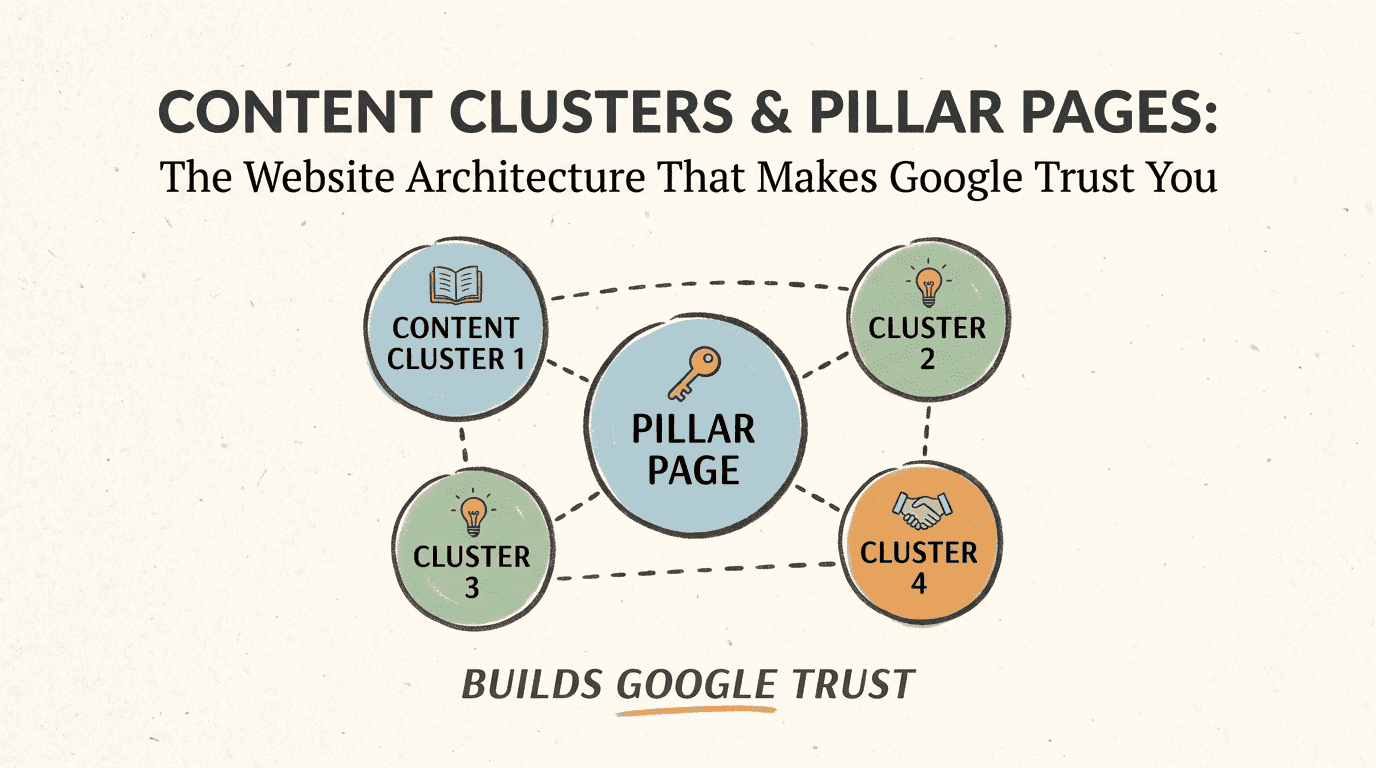
Why Most Websites Struggle to Earn Google's Trust
If you’ve been paying attention to SEO trends, you’ve probably heard about Content Clusters and Pillar Pages. It’s not that Google’s got some secret preference for a particular website format—these tools just make information easier to find and understand, both for people and for search engines.
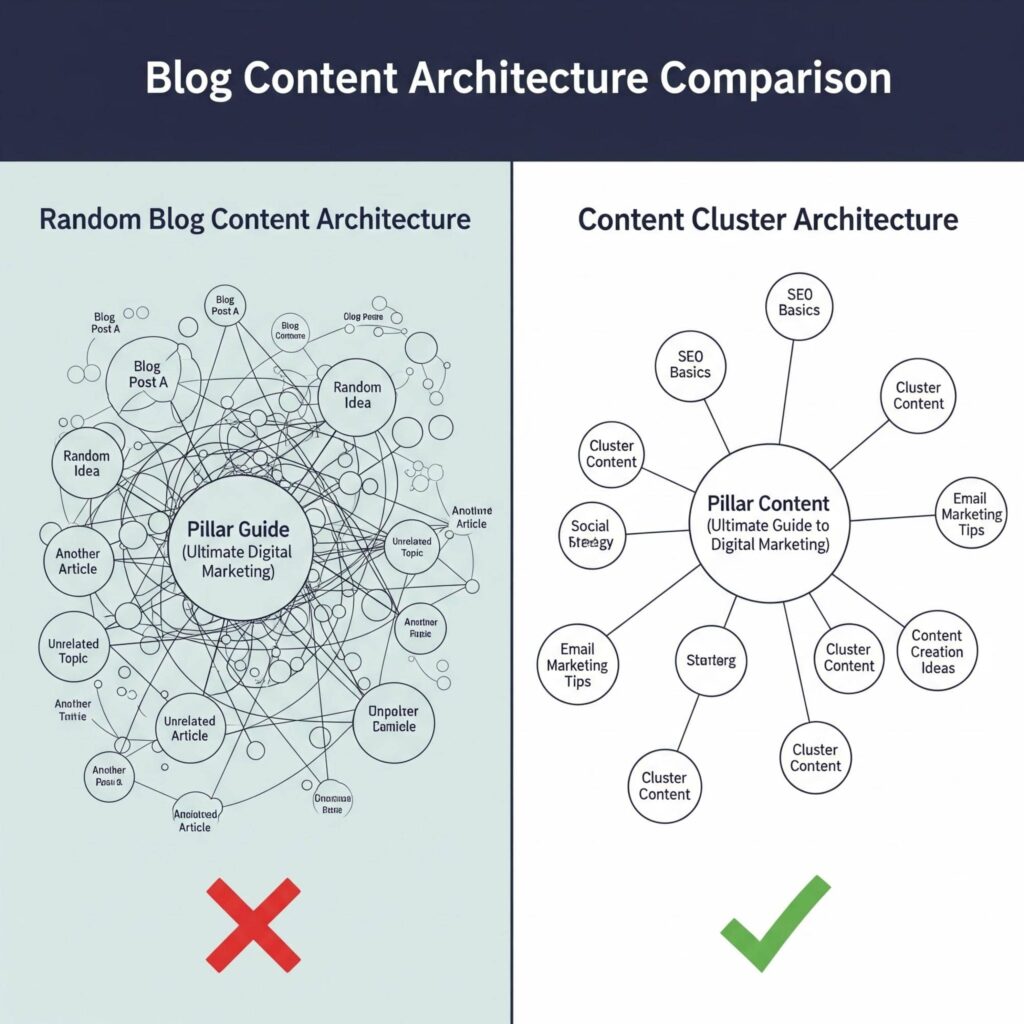
Here’s where a lot of websites get it wrong: They concentrate on producing as much content as possible, chasing every keyword they can think of. But just publishing more articles doesn’t guarantee better rankings. In fact, it often backfires.
A platform filled with various blog articles tends to get lost in the noise, while a smaller website with a logical structure stands out.
SEO isn’t only about keywords anymore. It’s about showing that you truly understand your subject—building what’s called topical authority. Google wants to point people toward sources with genuine expertise.
Content Clusters and Pillar Pages genuinely shine here. They organize what you know in a way that feels natural, so visitors—and search engines—find your site easier to trust.
In this guide, I’ll show you how these strategies actually work, why they matter so much for building authority, and how a few changes to your site can finally get you that visibility and trust you’ve been chasing in search results.
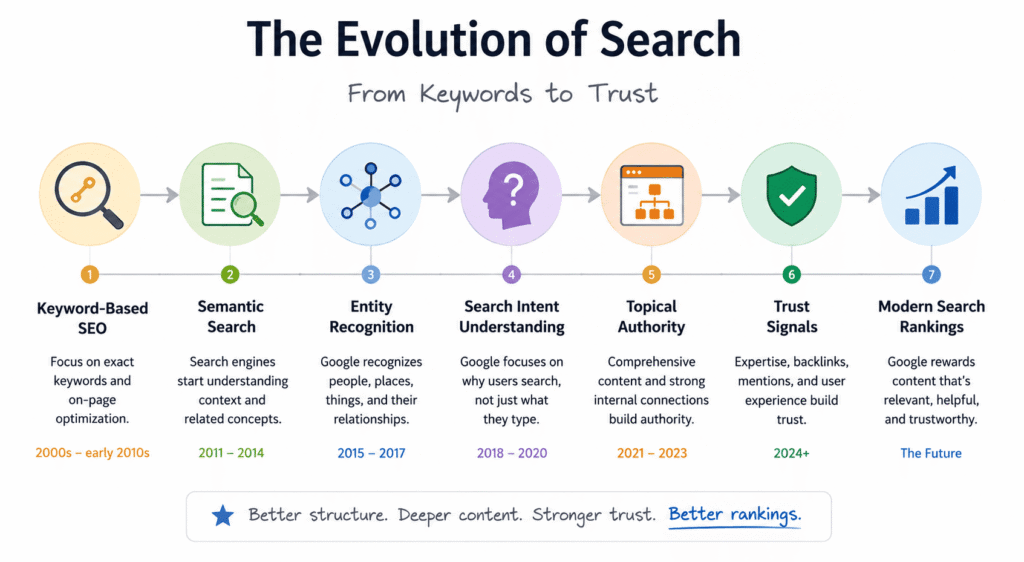
Why Google Trust Matters More Than Ever - Google's Shift from Keywords to Topics
➜ Semantic search evolution
Google isn’t just counting keywords anymore. These days, Google tries to figure out what you actually mean when you search for something—not just the words you type in. This shift is what people call Semantic SEO.
For example, you type, “best website structure for SEO.” Google’s not just looking for that exact phrase. It understands that you might care about things like internal linking, content clusters, topical authority, and the layout of your site. Those connections matter, even if you never say the words directly.
➜ Entity recognition.
Google uses Entity-Based SEO through the Google Knowledge Graph to spot entities—people, brands, places, ideas—and see how they all fit together. So it’s not reading your page as a single chunk. It’s mapping out relationships across topics and entities, trying to learn how everything connects for content clusters.
➜ Search intent understanding.
Google is also obsessed with search intent. What are you actually hoping to do or learn? The search engine digs into intent, so the content that gives the best answer wins.
➜ Topic relationships.
And when it comes to topics, context is everything. Google values clear content structure and thorough topic coverage. A site with a disconnected mess of articles? Not impressive. A site where articles link together and build on each other? That’s what Google trusts.
How Google Evaluates Topical Authority.
➜ Content breadth.
If you want to be seen as an expert, don’t just skim your topic. Explore thoroughly. If your site is all about SEO, cover everything—keyword research, tech details, content tactics, and how your site’s set up. Don’t stop at link-building.
➜ Content depth.
It’s not just about writing lots of content. Your articles need real depth—clear answers, helpful insights, the kind of details that help people solve problems.
➜ Internal relationships.
Don’t forget about internal links. You want your articles to interact with one another. A pillar page that points to detailed supporting posts? That’s how you show Google (and your readers) how everything’s connected.
➜ User engagement.
User engagement matters too. When people stay and read more, Google notices. Those are signs you offer something valuable.
➜ External credibility.
Trust isn’t just earned on your site. And it’s not just about what you publish. Getting other experts to mention or cite your work, picking up authoritative backlinks, or showing up on trusted sites—that proves you’ve got credibility beyond your own website.
In the end, Google is after one thing: trustworthiness. Give people honest, thorough, and well-connected content, and you increase your chances of earning that confidence.
What Are Content Clusters?
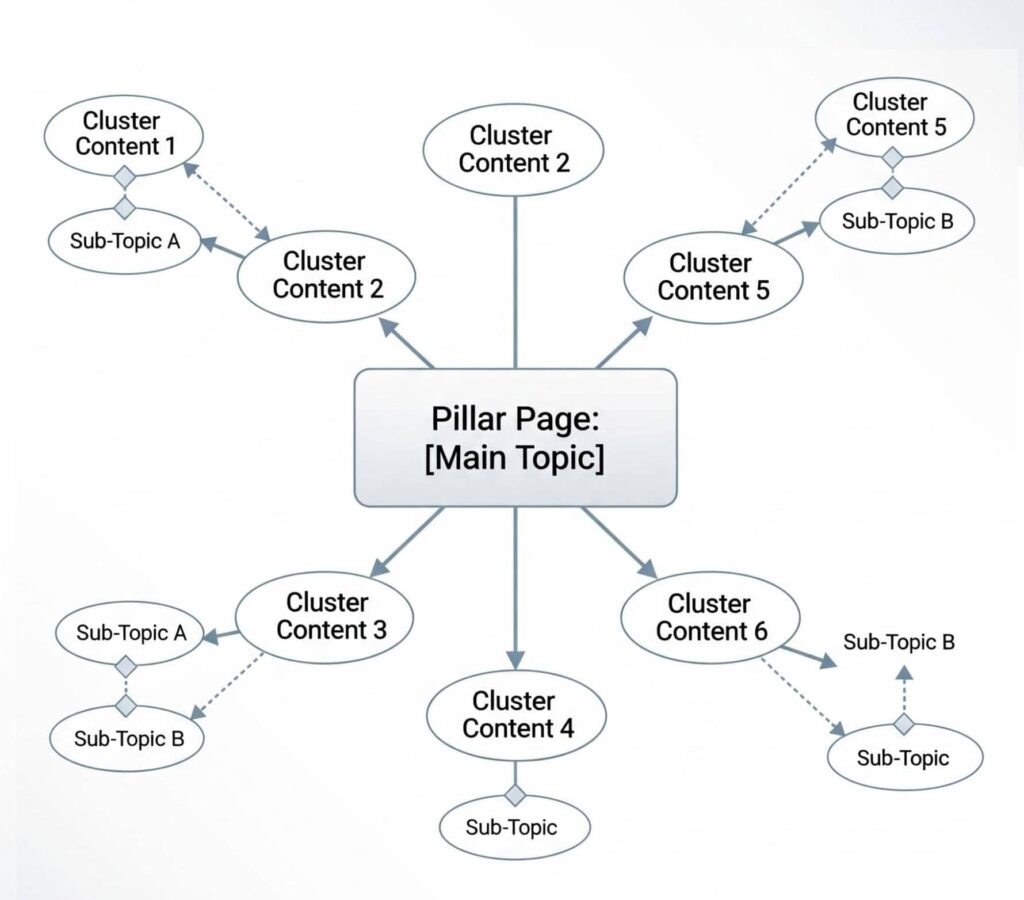
A content cluster is a group of related pages that all focus on a single main topic. You’re not just releasing random articles and hoping people find them. You start with a pillar page—it’s like the foundation, covering the big idea—then add a handful of supporting pages that dive into the smaller details or subtopics.
Each page links to the others, making it easy for someone (and search engines) to browse and actually find what they’re looking for.
You’ll see this setup.
- A pillar page, which gives an overview of the main topic.
- Several cluster pages, each covering a related but narrower angle.
- Smart internal links that tie all these pages together.
People use content clusters all the time in SEO strategies. They’re handy for organizing information in a way that makes sense, both for readers looking for answers and for search engines figuring out your site.
How Content Clusters Work ?
Consider a hub-and-spoke system—it’s a lot like that. Put the pillar page in the center. It offers the big-picture view and then points you to more detailed articles, which are the cluster pages.
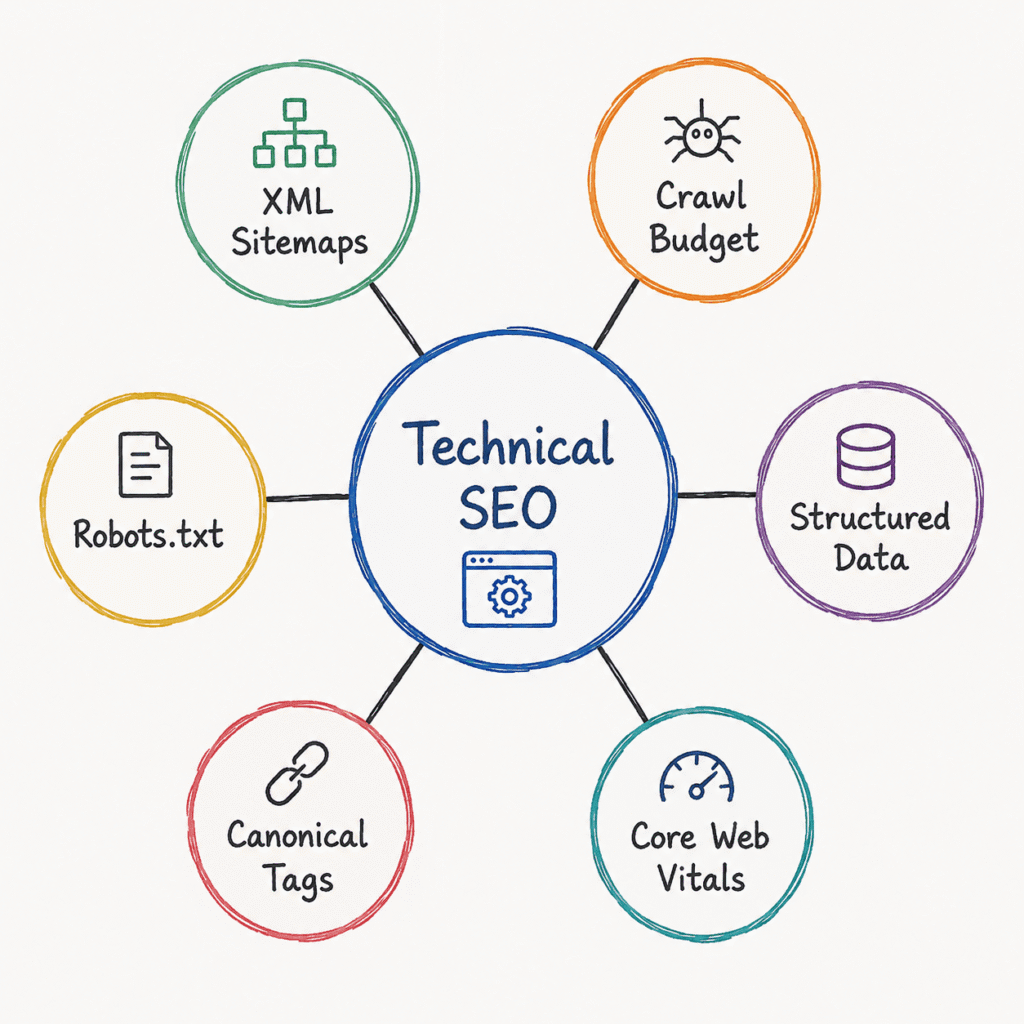
Let’s say your website is all about Technical SEO. You’d start with a Technical SEO Guide as your pillar page. Then you could write focused articles about things like
- XML Sitemaps.
- Crawl Budget.
- Structured Data.
- Core Web Vitals.
- Canonical Tags.
- Robots.txt.
Each of these cluster pages links back to the pillar page, and the pillar links out to each cluster page. Readers stay guided, and search engines grasp your content flow.
Why Search Engines Prefer Content Clusters ?
Search engines like Google want to understand what your site’s really about. content clusters make that easy.
Core Benefits:
- Instead of seeing bits and pieces of information, search engines find a whole set of pages covering one topic from a bunch of angles.
- Internal links aid in outlining these relationships, which gives search engines more context about your site’s expertise.
- Linking your pages together helps search engines discover everything faster and index it better.
- If you cover a topic from every angle, you make it clear you are well-informed—which builds trust and proves your authority over time.
What Is a Pillar Page ?
A pillar page is basically your main go-to spot for any big topic you want to cover. Consider it like a central hub. It gives readers an overview of a subject, then sends them to all the in-depth articles that cover specific corners of that topic.
So, let’s say you’re making a pillar page about SEO. You’d start with the basics—keyword research, technical SEO, content strategy, link building—and then link each of those sections to separate guides that examine them much more thoroughly.
This setup just makes things easier. Readers can find what they need fast, and it helps search engines see how all your content is connected. That’s why pillar pages are such a big deal in SEO right now.
A smart, well-organized pillar page keeps your website content structure neat and builds your authority on the topic you’re covering.
Trying to learn how to build a Pillar Page? The whole idea is to create a resource that forms the backbone of a bigger content cluster.
Types of Pillar Pages
Honestly, not all pillar pages look the same—how you build yours really depends on your topic and what you want the page to do.
➜ Resource Pillars
These are like comprehensive guides. They teach readers about a broad topic and point them to all your best resources. Example: “Complete SEO Guide.”
➜ Topic Pillars
Here, you’re organizing everything around one main subject. This is your content’s home base for that idea. Example: “Content Marketing Hub.”
➜ Service Pillars
These pages explain a service your business offers and connect readers to other content that answers their questions. Example: “SEO Services.”
➜ Product Pillars
If you want people to really get a particular product category, these pages break down features, benefits, and use cases. Example: “Marketing Automation Software.”
Essential Elements of High-Ranking Pillar Pages
A strong pillar page is easy to navigate, organized, and actually useful for your readers.
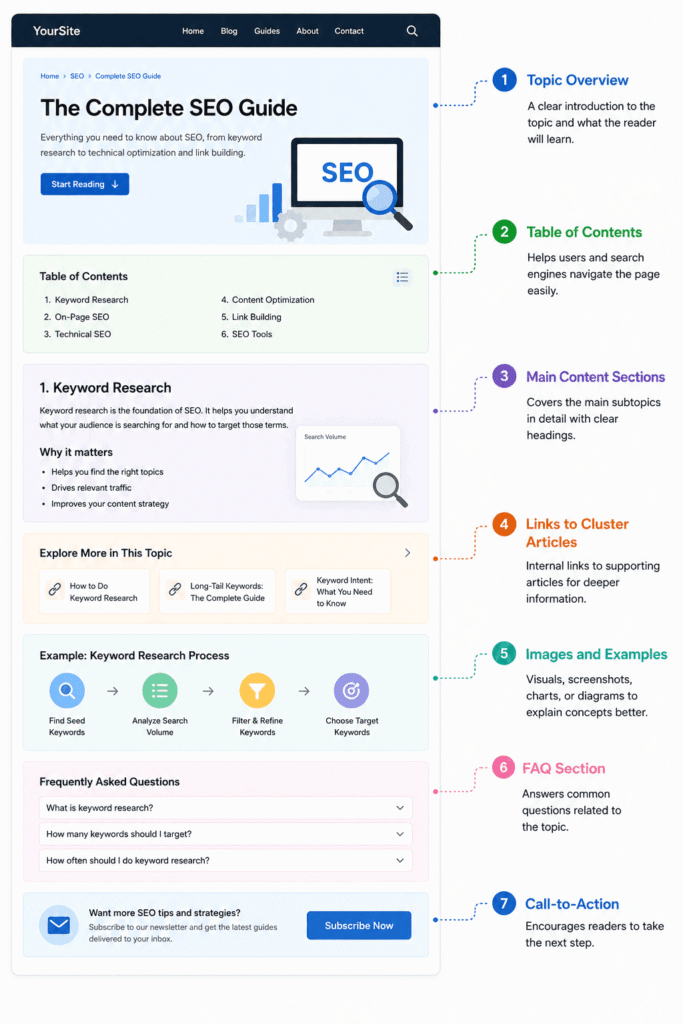
- Start with a wide-angle look at your main topic—give people a solid overview before diving into the subtopics they actually care about.
- Make navigation easy. Clear headings are important, and people find what they need fast with a table of contents. Keep everything simple to browse.
- Don’t forget your internal links. Point readers to your more detailed posts, so they can jump into details anytime. Google likes that, too. It helps both visitors and search engines understand the way your content connects.
- Mix things up with multimedia. Add images, charts, or a quick video. People stick around longer when you don’t lean on text alone.
- Add some schema markup, so search engines know exactly what your page’s about. That way, your content stands out in search results.
- Don’t let your pillar page become outdated. Revisit it and update it.
How Clusters & Pillar Pages Improve SEO - Strengthening Internal Linking Strategy
One big benefit of content clusters is a stronger internal linking strategy.
➜ Sharing Link Equity.
Linked cluster and pillar pages share authority. So instead of having disconnected, solitary pages, all your related content supports one another.
➜ Context Reinforcement.
Internal links do more than guide readers—they show search engines which pages matter most in a group and how your topics fit together.
➜ User Navigation Improvement.
Readers notice, too. They aren’t required to search for the next piece—they just follow the links and keep exploring.
That’s why thoughtful SEO Website Architecture isn’t just for Google. It actually makes things easier for your readers, too.
Building Topical Authority
Simply producing articles does not improve your position in the rankings. The trick is making those articles work together.
If your site has 20 posts about one subject, all linked and organized, you’ll usually outrank a similar site with 20 random posts and build Topical Authority. Connected content proves you really master your field.
When you dig into a topic from different angles and tie it all together, you start to look like an expert. That’s the whole point of using topic clusters SEO in your content strategy—it helps you build trust and show Google (and your readers) you’re the real deal.
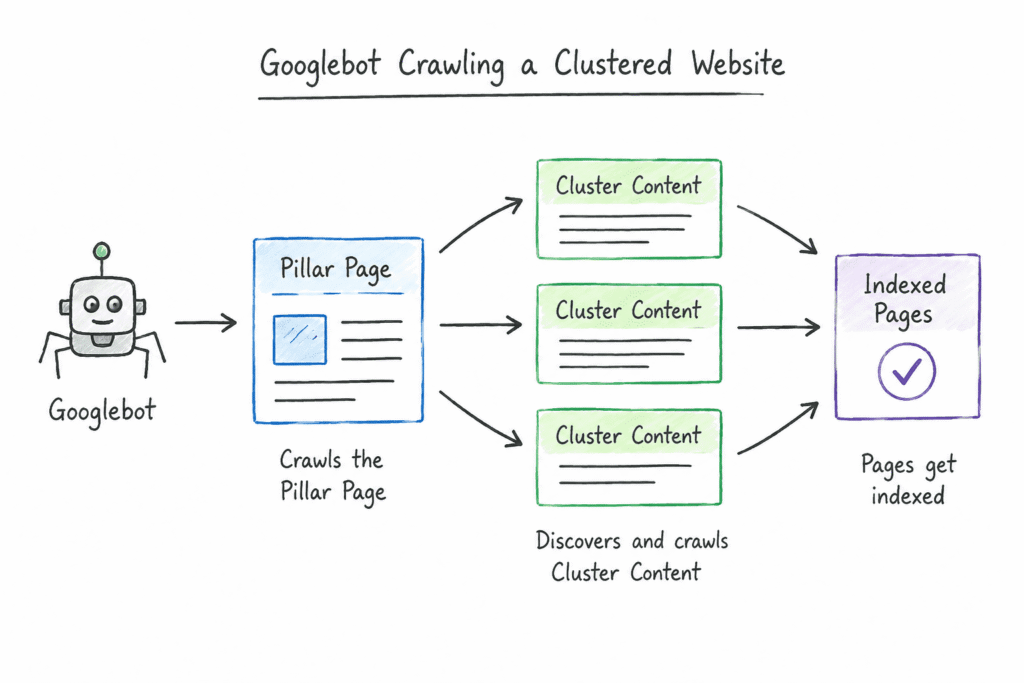
Help Search Engines Find and Index Content
Search engines use links to find content. They may do this more easily if you group your pages.
Google can more easily identify links and index the key material more quickly when your website has a clear structure and pages flow logically from one to the next.
Your key content won’t get lost.
Enhancing User Experience Signals
Content clusters aren’t just about SEO—they make your site better for humans, too. When people easily find related info, they spend more time digging around. That usually means
- More page views per visit.
- Longer time on site.
- Higher engagement.
- More return visits.
While user signals don’t always send your rankings straight to the top, they do prove that real people enjoy what you’re offering. That’s the kind of thing Google wants to reward.
How to Build a Content Cluster Strategy Step by Step ?
Step 1 – Identify Core Business Topics.
Start with the basics, and pay attention to what matters most to your audience and your business.
Ask a few simple questions:
- What are your customers struggling with?
- What areas does your team really understand?
- Which topics actually bring in leads or sales?
Write down your answers, and you’ll see your main topics appear.
For instance, if you run an SEO agency, maybe your core topics are
- Technical SEO.
- Local SEO.
- Link Building.
- Content Strategy.
Later, these broad ideas will become your pillar pages.
Step 2 – Create Your Pillar Pages.
Pick the main topics that really need a pillar page. Go for subjects that support your business goals and attract the people you want to reach.
Focus on topics with real commercial value. Your pillar page should cover the topic in general terms—give readers the big picture but also link out to more focused, in-depth articles.
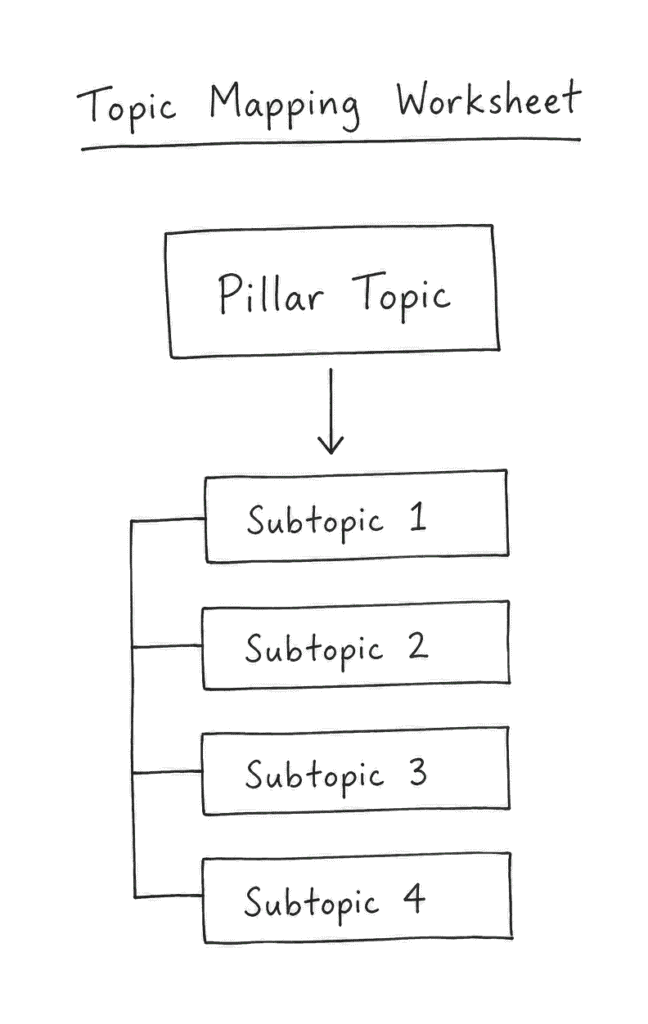
Step 3 – Map Supporting Cluster Content.
Take each big topic and split it into smaller pieces. These smaller topics become your cluster pages. Each one answers a direct question or tackles a specific angle.
Common content types include
- Guides.
- Tutorials.
- Comparisons.
- Case Studies.
- FAQs.
For example, a Technical SEO pillar page might link to articles about:
- XML Sitemaps.
- Crawl Budget.
- Structured Data.
- Core Web Vitals.
Step 4 – Build Internal Links.
Internal links are what turn separate pages into a content cluster.
A few basic rules can help
- Every cluster page should link back to the pillar page.
- The pillar page should link to every cluster article.
- Related cluster pages should link to each other when it makes sense.
This setup makes it easier for visitors to explore related info, and it helps search engines see how everything connects.
Step 5 – Add Schema Markup.
Schema markup gives search engines more information about your content.
Common schema types include
- Article.
- FAQ.
- Breadcrumb
- Organization
- Person.
- VideoObject
- WebPage
Schema can’t improve poor content, but it helps search engines display pages more clearly.
Content Cluster Example
Let’s break down how a content cluster actually works—it’s much easier to grasp with an example. Consider digital marketing.
Example Topic – Digital Marketing
Think of the “pillar page” as the main hub. It’s your guide to digital marketing, which covers all aspects and links out to more specific pages.
➜ Pillar Page
Start with the pillar: the “Digital Marketing Guide.” This page gives you the basics. You’ll find links to all the deep dives.
➜ Cluster 1: SEO
SEO is one of the core areas of digital marketing. It goes further, dividing content into topics like
- On-Page SEO.
- Technical SEO.
- Link Building.
- Keyword Research.
Each of these has its own page, which links back to the main guide.
➜ Cluster 2: Content Marketing
Content marketing is another important part of the cluster. You’ll find pages about
- Building a content strategy.
- Setting up an editorial plan.
- Running content audits.
These all show you how to actually plan and improve content.
➜ Cluster 3: Analytics
Analytics measures results and guides better decisions. Here you see articles exploring tools like
- GA4.
- How to track conversions.
- How attribution models work.
Each one links back to the main analytics section of the pillar page.
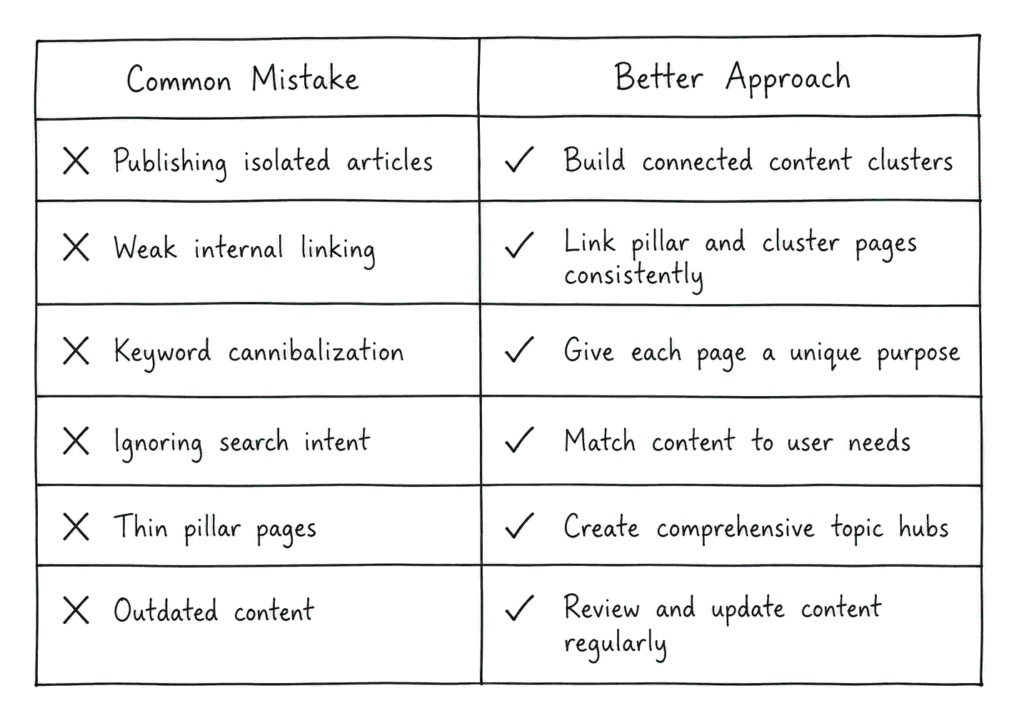
Common Content Cluster Mistakes to Avoid
➜ Publishing Isolated Content
Just posting standalone articles without tying them to a bigger topic doesn’t really help.
Sure, one post might catch a keyword or two, but it doesn’t build your authority on a subject. Every piece should fit into a broader content cluster, connected to other articles that make sense together.
➜ Weak Internal Linking
Internal links are the backbone of a good cluster. Search engines could overlook the structure of your content if linked pages are disconnected.
Keep it simple: link the cluster pages to the pillar and the pillar page back to supporting pieces. If you spot related articles that add value, link those too.
➜ Keyword Cannibalization
If you have several pages targeting the same idea, they just end up competing with each other in search results.
Writing multiple articles titled “Technical SEO Guide” hurts your chances instead of helping. Give each page its own focus and make sure it covers a unique angle or intent.
➜ Ignoring Search Intent
You have to know what your audience actually wants when they search.
People looking for a beginner’s guide want something totally different from someone searching for a hands-on tutorial or a product comparison.
If your content misses the intent, it’s harder to rank, and honestly, it’s not much use to the reader.
➜ Creating Thin Pillar Pages
Pillar pages need meaningful content. They’re more than just collections of links.
A real pillar page actually explains the topic, answers common questions, and gives enough background so readers know what’s going on prior to diving into the related articles.
➜ Neglecting Content Updates
Content clusters aren’t set-and-forget. Topics evolve, search trends change, and old data loses relevance.
Give your pillar and cluster pages regular attention. Updates keep your content useful and visible.
The Future of Content Clusters in AI Search - Why AI Search Rewards Structured Content ?
➜ AI Overviews
AI search gathers information from across the web and combines it to provide answers. If your content’s organized into clusters by topic, you’re making that job a lot easier.
Grouping related pages gives AI a clear view of what your site covers and how everything ties together.
➜ Entity Relationships
Today’s search engines care more about the relationships between topics, brands, people, and products than just plain keywords.
Good content clusters help search engines untangle those connections and place your site within broader discussions—that’s at the core of Entity-Based SEO.
➜ Contextual Understanding
Search engines don’t just look at a single page—they want the big picture.
When pillar pages and their cluster pages are linked internally, it draws a clear map of your expertise, showing both the breadth and depth of your content.
Websites Are Becoming Knowledge Graphs
➜ Entity Mapping
Every new page adds a layer of context to your overall topic. When you connect these pages, it forms a web of entities and supporting info that’s much easier for search engines to read and understand.
➜ Semantic Connections
Topics never really stand alone.
Imagine you have a page about Technical SEO—it’s naturally linked to XML Sitemaps, Crawl Budget, Structured Data, and Core Web Vitals.
Linking topics shows authority and guides search engines. That’s what makes Semantic SEO so important these days.
➜ Authority Networks
If your content is closely linked, search engines don’t just see a collection of scattered posts. They see a web of expertise. It shows you actually understand your field, and they start to trust you as an authority.
Google’s Knowledge Graph works the same way—it doesn’t just look at keywords without context. It groups info around topics and relationships. That deeper understanding is what sets you apart.
Frequently Asked Questions.
Q1: What is a content cluster in SEO?
A content cluster is basically a group of related pages all built around one main topic. You start with a pillar page—that’s your big overview—and then include several supporting articles that dig into specific subtopics.
These pages all link to each other, which makes it easier for search engines to figure out what your site’s all about and that you are an expert.
Q2: What is the difference between a pillar page and a cluster page?
Consider a pillar page as your main home base. It brings everything about a big topic together. This setup keeps your content properly organized. Everyone finds what they need without any hassle.
Q3: How many pages should a content cluster have?
Honestly, there’s no set rule. Most clusters start with one pillar page and somewhere between five and fifteen supporting cluster pages. The real number depends on how deep your topic goes and what your audience wants.
Q4: Do content clusters help with Google rankings?
They definitely help. Content clusters improve how search engines see your website since you’re organizing your content and connecting related ideas. There’s no guarantee you’ll hit the top spot, but clusters line up with what Google looks for when ranking sites.
Q5: How do content clusters support topical authority?
With content clusters, you cover a topic from all angles instead of only publishing random articles. This shows search engines you really know the subject, and it’s way easier for them to trust you as a solid source.
Q6: What is the best internal linking strategy for content clusters?
Just stick to the basics:
- Every cluster page should point back to your pillar page.
- Your pillar page should link out to every cluster page.
- If two cluster pages talk about similar things, link them together.
It directs readers and displays content links for search engines.
Q7: Are pillar pages still important for SEO in 2026?
Yes. They organize content and show search engines your expertise on a subject. Search engines see the connections between related ideas.
Additionally, they fit right in with AI-powered search, so they aren’t going anywhere.
Q8: How often should pillar pages be updated?
Pillar pages organize content and build expertise. They also show search engines the way your ideas connect. They work well together with AI-powered search, so they’re still as valuable as ever.
Conclusion: Build a Website Google Can Trust
Google doesn’t just look at one page anymore—it cares about how your content fits together, if you really know your topic, and if your site shows clear expertise.
So content clusters and pillar pages? They’re not just trendy buzzwords. They actually matter. While pillar pages gather everything together under a single primary topic, clusters delve deeper into a subject. Internal links connect your articles and show Google what’s important.
When you organize your content like this, it’s easier to prove you understand your subject. That means you hit those E-E-A-T signals: experience, expertise, authority, and trust. And a solid site structure keeps your content visible and growing for the long run.
The way people search keeps changing—they’re looking for real answers, not just scattered articles. If your content works as a team rather than individually, both users and Google notice. Connected, well-organized content makes it clear you’re an authority worth trusting.
Don’t just post random posts. Expand your topics, link pieces together, and answer the real questions people have. That’s how you help users and impress Google. It turns your site into something truly trustworthy.